ATHANTO / ATLAS
Pokemon Monomyth map
This free Pokemon Monomyth map locates 95 named places across Athanto. Search a town or route, highlight its area, and keep visited marks on your device. No account or uploads; download the PNG map or export your own JSON checklist.
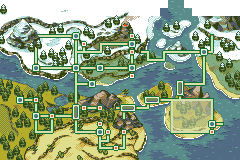
Map rendered from game data by DexDB; area references from its v1.1 map. DexDB ↗
Download town map · PNGHow to use this page
- Search a name
Enter the English name shown in the game, such as Speedwell, or a route number such as Route 14. Choose a category to narrow the list.
- Locate the area
Choose a place in the results. Yellow and red rectangles highlight its broad town-map area. Multiple rectangles can belong to one place.
- Keep your own progress
Mark places Visited and export JSON when you want a backup. Reset filters keeps these marks; Clear visited marks removes them from this browser.
Try an example
Enter Speedwell, then choose Speedwell in the results. The town area is highlighted. Mark it Visited, clear the search, and check that the visited total remains. Your mark is a personal note; it does not unlock anything in the game.
How do you read the Pokemon Monomyth map?
The town map gives a regional overview: water, roads, mountains and settlement markers help you orient yourself before exploring. Its native image is 240 by 160 pixels. This page enlarges those pixels without inventing extra terrain detail. The red outline and yellow tint are this guide’s selection overlay, separate from the game image.
A highlighted rectangle describes a region on this overview, not the exact tile where your character stands. Some caves and large areas have several rectangles. Selecting a name highlights all of its recorded regions together. Use the original English label when comparing the result with the name displayed in your game.
What does the Pokemon Monomyth map lookup show?
The searchable index groups 107 map rectangles under 95 place names. It includes towns, numbered routes, caves and other areas from DexDB’s published Monomyth map. The list is useful when you remember a name but cannot immediately place it on the regional image. It is not a route planner: adjacency on the picture does not establish an open passage.
Open a result’s community reference when you need more information about that area. Treat encounter tables, gifts and story requirements as separate claims with their own version context. This page does not calculate encounter probabilities, identify every hidden item or certify that a destination is reachable at your current story stage.
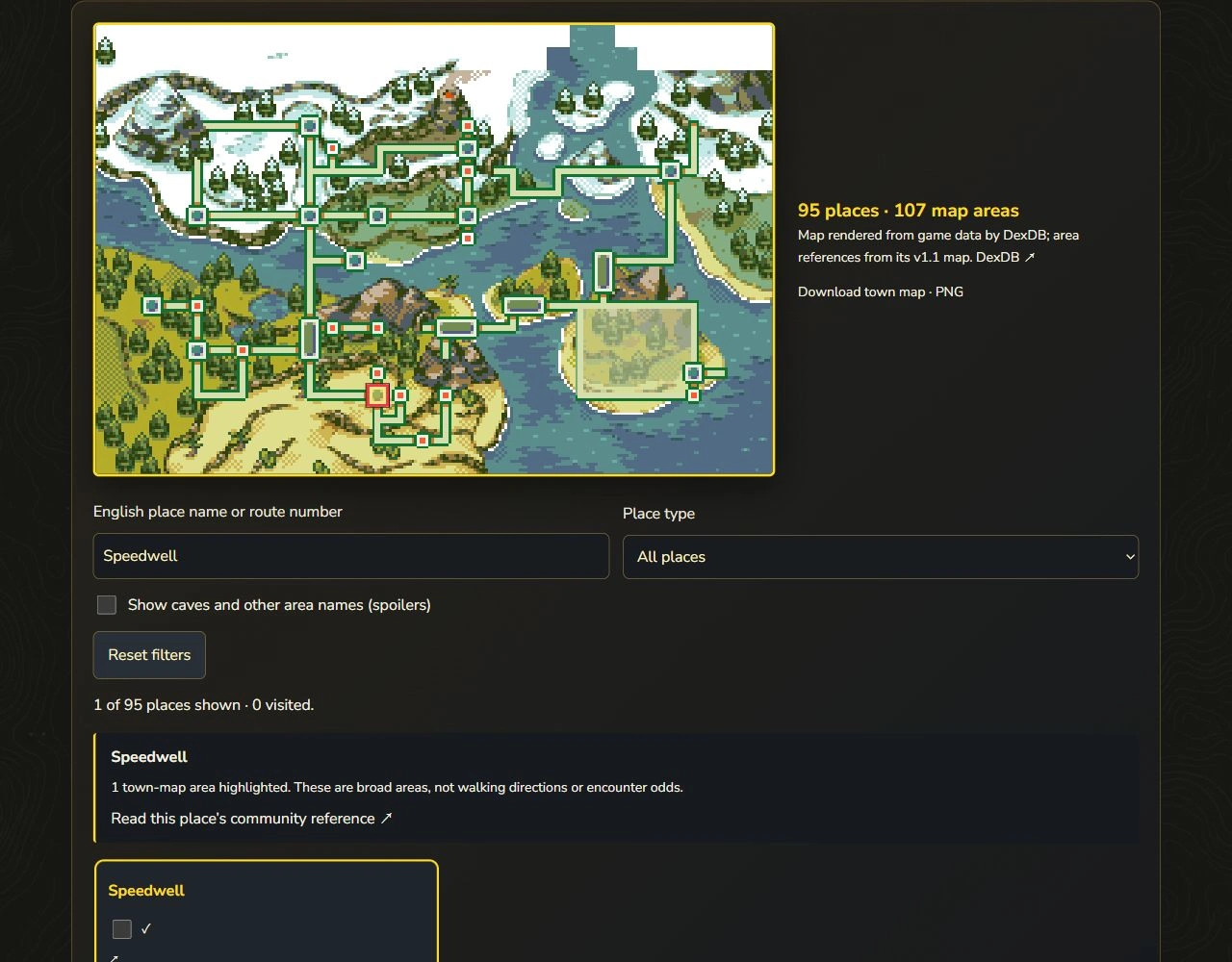
Speedwell selected: the marker and result describe the same named place. Regional reference, not a turn-by-turn map.
Field Guide interface · example onlyOpen full-size image ↗Can you use the map with fewer spoilers?
The initial search list shows towns and numbered routes. Enable the other-area checkbox when you want cave and special-area names as well. This is a simple name filter, not a guarantee of a spoiler-free experience: the regional image and some town names can themselves reveal places you have not visited.
If you are playing blind, search only the name you already encountered and avoid opening a full external location article. The filter does not infer your badges or inspect your save. A place hidden by the checkbox is still part of the reference dataset; hiding its name here does not imply it is missing from the game.
How does Pokemon Monomyth map save visited places?
Visited marks are stored in this browser under stable place identifiers and shared between the English and Chinese map pages on the same site. They are independent of the Pokédex’s Seen and Caught marks. Private-browsing restrictions, clearing site data or switching devices can remove or separate your records. The page reports when storage is unavailable.
The JSON export contains the schema, export time and names of places you marked. It does not contain a game save, account information or a location history. Downloading a backup does not send it to us. There is no automatic cross-device sync or JSON import in this version; keep the file as a readable checklist.
Which game version and sources does the map use?
The area layout and place grouping were checked against DexDB’s v1.1 reference on November 5, 2026. The artwork belongs to the game’s creators; DexDB supplies the published rendering and region references. This independent guide adds the bilingual search, selection explanation and visited checklist. It has not independently played through every map entrance.
Team Monomyth’s current download configuration identifies version 1.1, released November 3, 2026. Our illustrated Pokédex retains its stated v1.0 field scope. A later patch may change an entrance or encounter without changing this overview image. For a conflicting result, record your game version and compare the source rather than treating a personal visited mark as proof.
What if a place or Pokemon cannot be found?
Clear the type filter, check the English spelling, and enable cave and other-area names. Searching a Pokémon name will not return its encounter area because this index contains place names. Use the illustrated Pokédex to identify the species first, then consult a separately sourced location record.
A place-name mismatch can reflect an alias, an interior map or a source-version difference. It is not proof that an area or Pokémon was removed. Keep the selected name and game version when asking for a correction. For startup or white-screen problems, use the installation and emulator guides; the map cannot diagnose a ROM file.
Questions, answered
Is this Pokemon Monomyth map free?
Yes. Searching all 95 place names, viewing the PNG and exporting your visited JSON are free, with no account and no daily search limit.
Is this a complete walkthrough?
No. It is a town-map lookup. Walking routes, story triggers, hidden items and encounter odds require additional evidence.
Why does one place highlight several rectangles?
One named place can occupy several regions on the town map. All recorded rectangles for that name are highlighted together.
Can I search Pokemon names?
This tool searches places. Identify a species with our Pokédex, then check a location-specific source.
Does Reset delete my progress?
Reset clears the search, category, extra-area filter and highlight. It keeps visited marks; use Clear visited marks to remove those.
Does this read my save file?
No. No files are uploaded or inspected. Visited marks are your own browser-local notes.
Can I download the map without a watermark added by this site?
Yes. The PNG download is the displayed 240 × 160 map image; this site adds no watermark. Selection overlays are not baked into that file.
Why do some places disappear?
The name, category and other-area filters combine. Clear filters or enable other-area names to broaden the results.
Sources & scope
95 place names / 107 region rectangles, based on the publisher’s v1.1 map. Broad location reference; no claim of a tested complete walkthrough. Visited data stays in your browser.
Next steps
- Identify a Pokemon in the illustrated Pokedex →
- Choose a documentation source →
- Get the official cover artwork →
- Compare starter choices and evolution references →
- Check installation and version references →
- Follow the opening and first-Gym route →
- Find location-based evolution methods →
- Barbed Cave: entrances, spikes and exits →
- Patchy quest: three leads and report-back steps →