Your trade preparation checklist
Tick off your setup as you go. Progress stays in this browser, including when you change language.
What must I check before Pokemon Monomyth trading?
Both players should be using Monomyth. Team Monomyth rules out trading with official Generation 3 games. Some Pokémon and held items are also restricted by the story, so a successful connection does not guarantee that the particular trade is permitted.
Back up each player's normal save before the session. If one player usually plays on a phone or flash cart, prepare a desktop working copy first. The published Celio workflow requires a computer running Windows, macOS or Linux; it is not a direct phone-to-phone procedure.
Get the Celio client from the linked project
Open Celio Link from Team Monomyth's Trading page and choose Online Emulator Link. Select mGBA and follow its Download Script route to the client package for your operating system. The team's instructions use a specially configured mGBA build, so do not assume any installed copy already has the needed integration.
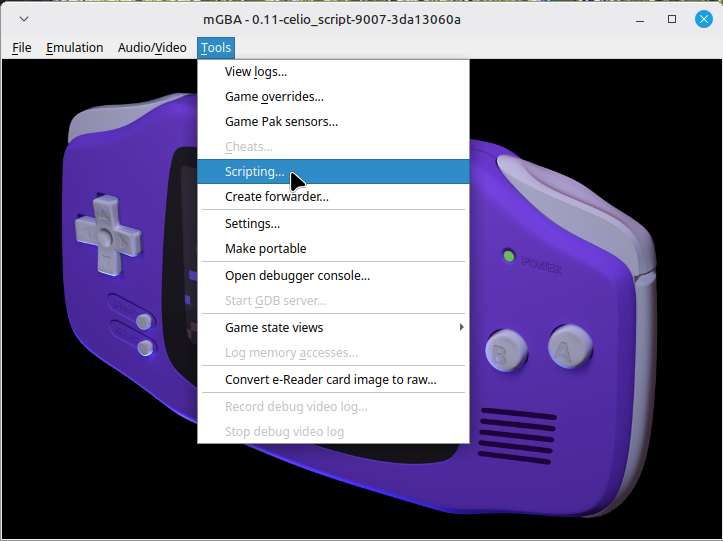
Extract the package, start its emulator and open Tools, then Scripting. In that window, use File, then Load Script, and choose the packaged .lua file. For platform-specific packaging, use the current release instructions: the team's guide notes that its macOS package is grouped with the Linux download and Linux may need executable permission.
Join the same session, then start the in-game link
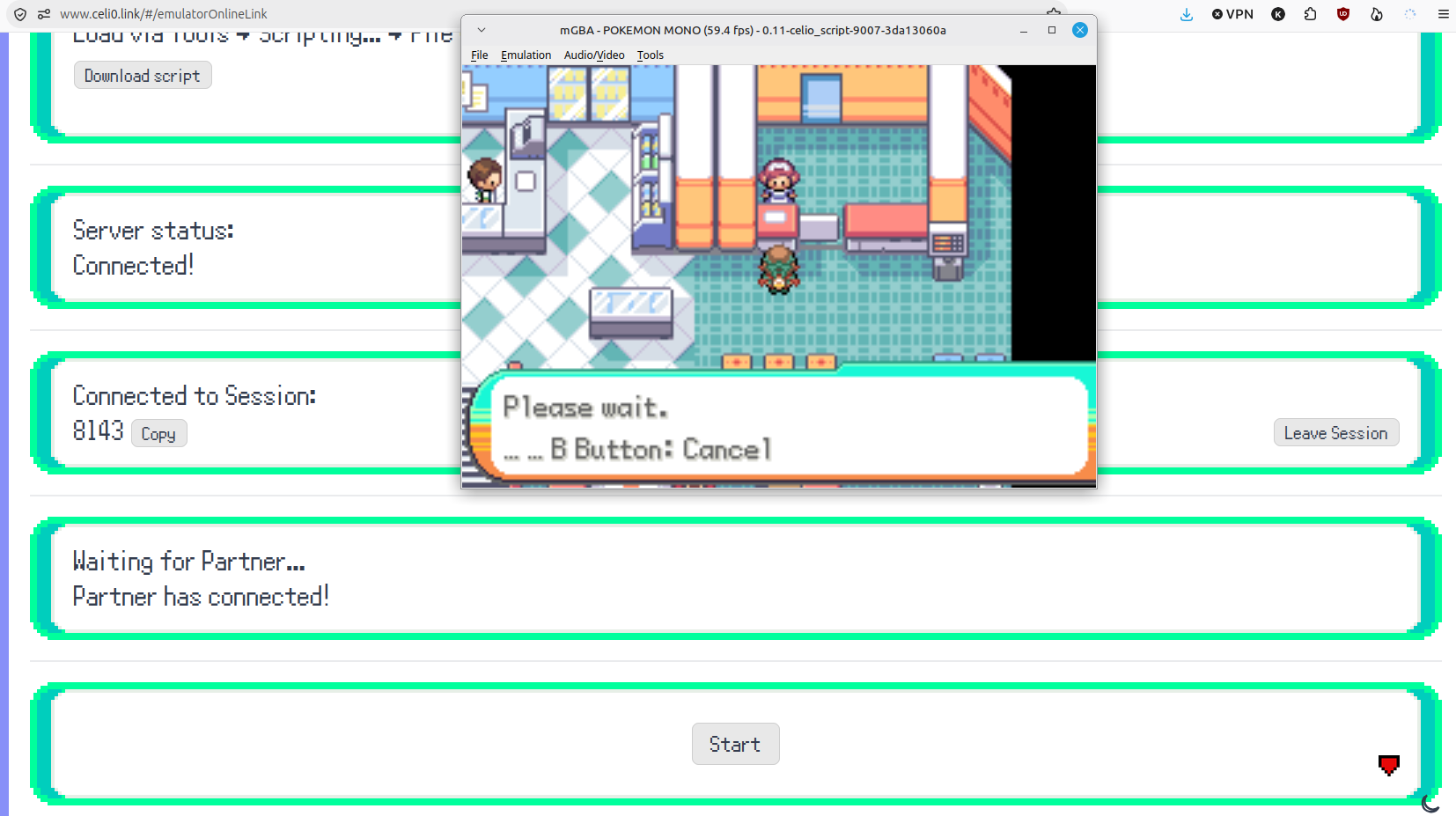
If the browser prompts to let the Celio site communicate with the client, confirm that you are using the expected site and application. Wait until the site reports a connected server. One player creates the session ID; the other joins that same session.
Load the patched Monomyth game and the correct save in the client. Both players go to the Pokémon Center's Link Trades counter. Only then use Start on the Celio webpage. This order separates a website/client connection from the in-game link: being in the same web session is only one stage of the process.
When the activity is finished, use Disconnect on the website. Before returning to another emulator or device, preserve the updated save and confirm that the expected progress loads. Keep the pre-trade backup until that check succeeds.
Understand why a particular trade may be refused
The team's FAQ says high-level Pokémon may require story progress beyond simply having many badges. It also explains that a found starter initially belongs to someone else, and that permission matters before trading or releasing it. A refusal can therefore be a progression rule rather than a network fault.
Story-important Pokémon and rare or story-important held items can also prevent trading. Do not respond to every blocked trade by reinstalling the client. Note the game's exact message and the Pokémon's held item, then compare that with the team's restrictions. The published FAQ does not provide a complete level threshold table.
Real hardware and battles use different routes
For two real GBA systems, Team Monomyth describes two suitable flash carts and a physical GBA Link Cable. It explicitly excludes the GBA Wireless Adapter. Its alternative for a flash-cart save and a PC player is to copy the save to desktop for Celio, then return the updated save to the card.
Link Battles are not supported by the modified battle engine. Although the trading FAQ mentions a QR-code team export and the custom Showdown project Athanto Colosseum, the separate Showdown page currently says Under Construction and gives only a tentative late-2027 target. Do not plan a battle session around it being available now. This guide does not claim to have tested team export or a live Celio session.
Track preparation without confusing it with a live test
Use this page's checklist to record the steps you have personally completed: backup, client and script, shared session, correct loaded save, both players at the counter, and a clean disconnect. A checked item records your progress; it does not inspect Celio's connection, validate a save or confirm a successful trade.
If a later stage fails, return to the first unconfirmed stage. For example, no server connection belongs to the client/browser setup, while a refused Pokémon after entering the counter may be a game restriction. Keep those failure types separate in a support report.
Questions, answered
Can I trade with Pokémon Emerald, FireRed or another official Generation 3 game?
Why does the game say I cannot handle a Pokémon yet?
Can I use the GBA Wireless Adapter?
Does a connected Celio session mean the game is ready to trade?
Can I battle through the same link?
How can a phone player prepare for a Celio trade?
Sources & verification
- Team Monomyth: Link Trading Guide and FAQ ↗
- Team Monomyth: current Showdown development status ↗
- Celio Link: Online Emulator Link ↗
- Celio mGBA client release linked by Team Monomyth ↗
Updated · Monomyth Field Guide